All reports are produced to a Report Viewer, which is functionally similar in both the desktop and browser programs.
The following options are available from the Viewer Toolbar:
|
Document Map - not used in TallyPro reports |
|
|
Go to first page |
|
|
Go to previous page |
|
|
Go to next page |
|
|
Go to last page |
|
|
Go back to parent report - not used in TallyPro reports |
|
|
Stop Rendering - if the report is very large and seems to be taking too long to load (render) then clicking this button will stop further pages being loaded |
|
|
Refresh - rerun the report - this can be useful if a number of rows have been expanded and the original layout is required again |
|
|
Print the report - to a selected printer |
|
|
Print Layout - a useful tool that enables the exact layout of the report on the page to be viewed |
|
|
Page Setup - allows selection of Paper size and source, orientation (portrait or landscape) and setting of margins (left, top, right, bottom) |
|
|
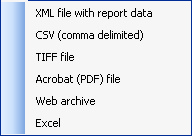
Export - a powerful feature that allows export of the report to the following data formats:
|
|
|
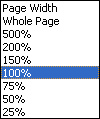
Zoom (view scale). Options are:
|
|
|
Search Box - enter a word into the box |
|
|
Finds the first record with word entered into the Search Box |
|
|
Finds the next record with word entered into the Search Box |